Skip to content

Blog

Copy paste in tmux session inside ssh

When you access your tmux session on a remote machine from different client machines, based on the client machine configuration and terminal, etc., some features will not work. One of them is copy-paste.

I used to have tmux-yank configured to xclip. But it didn't work will when I accessed my remote VM from a Windows machine running putty. Similarly I had to configure every new machine I start using which was time consuming. Majority of my copy-paste activities will be between tmux panes and windows. I don't usually copy from the local machine to the remote machine. So I used this simple hack.

Configured my .tmux.conf to redirect yank-ed to a temporary file as below.

bind -T copy-mode-vi y send-keys -X copy-pipe-and-cancel 'cat > /tmp/clipboard'

Configured .zshrc to load an environment variable from that temporary file on every prompt.

precmd() { export p=`cat /tmp/clipboard` }

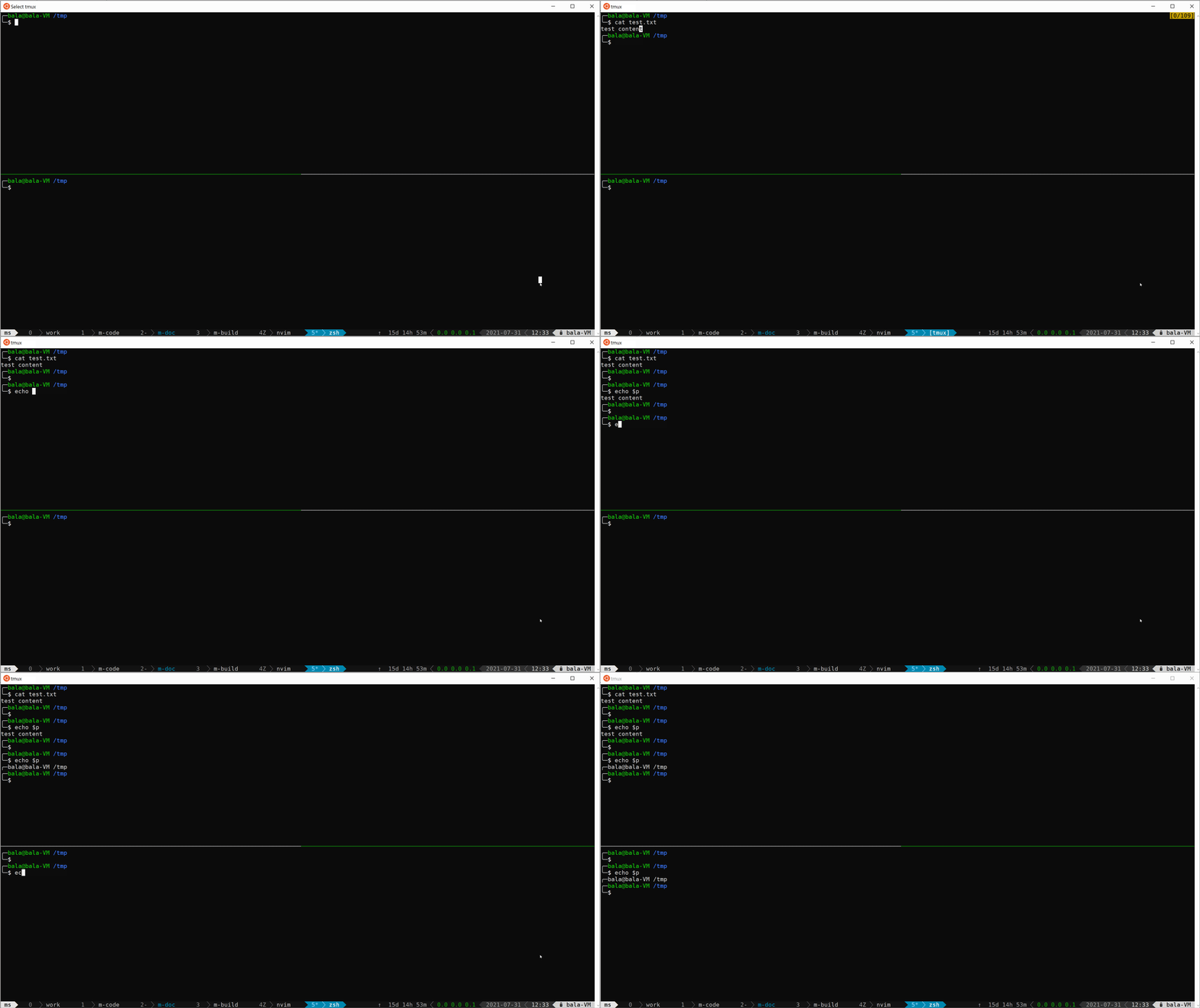
So if I copy any text in tmux using y, it will be populated into a environmental variable named p.

NOTE: As the environmental variable will be loaded upon next prompt only, after copying, you need to press enter once it to take effect

Below gif will show how it works tmux copy paste hack

Custom perf with custom kernel

There is no doubt that perf is an awesome tool. And eBPF enables us to attach an arbitrary code to any tracepoint. But both has one limitation. They cannot execute a kernel function. As if I want to call a kernel function whenever a tracepoint is hit. Its not possible today. It is not a big caveat. But will be very much useful while debugging kernel.

Lets say I want to trace all IPIs and want to record the source CPU, target CPU. And I want to know whether Idle task was running on the target CPU during the IPI. Inter Processor Interrupt or IPI is and interrupt sent from one CPU to another to wake it up.

NOTE: All the code referred here is from Linux-5.4.0

The code that sends IPI in x86 platform is native_smp_send_reschedule. Below is the code of that function.

void native_smp_send_reschedule(int cpu)
{
        if (unlikely(cpu_is_offline(cpu))) {
                WARN(1, "sched: Unexpected reschedule of offline CPU#%d!\n", cpu);
                return;
        }
        apic->send_IPI(cpu, RESCHEDULE_VECTOR);
}
The only argument of this function cpu mentions the target CPU - to which CPU IPI is being sent. I want to source CPU from which the IPI is originates.

To get current CPU kernel has a macro - smp_processor_id().

We can get the task-run-queue of that CPU using the macro cpu_rq(int cpu). And cpu_rq(int cpu)->curr will point to the task that is currently running on that CPU. If that task's pid is 0, it is the Idle task.

So my deduced requirement will be setting and tracepoint on native_smp_send_reschedule and call these kernel functions upon hitting that tracepoint. There is no way today. Thus I'm left with only one option - build my own kernel with necessary modifications.

Building custom kernel

I've cloned kernel repository from kernel.org. And checked-out to the desired branch. I'm running Ubuntu-20.05 inside a Virtualbox. So I'm using the kernel-5.4.0 which is already installed in my distribution.

bala@ubuntu-vm-1:~/source/$ git clone git://git.kernel.org/pub/scm/linux/kernel/git/stable/linux.git
bala@ubuntu-vm-1:~/source/$ cd linux
bala@ubuntu-vm-1:~/source/linux/$ git checkout -b v5.4.0 v5.4
bala@ubuntu-vm-1:~/source/linux/$ head -n6 Makefile
 # SPDX-License-Identifier: GPL-2.0
 VERSION = 5
 PATCHLEVEL = 4
 SUBLEVEL = 0
 EXTRAVERSION =
 NAME = Kleptomaniac Octopus
bala@ubuntu-vm-1:~/source/linux/$

Copied config from current OS. And make oldconfig

bala@ubuntu-vm-1:~/source/linux/$ cp /boot/config-5.4.0-52-generic ./.config
bala@ubuntu-vm-1:~/source/linux/$ make oldconfig
If any new configs were, select appropriately if you know it. Otherwise simply ignore it.

Applied following patch.

bala@ubuntu-vm-1:~/source/linux$ git diff
diff --git a/arch/x86/kernel/apic/ipi.c b/arch/x86/kernel/apic/ipi.c
index 6ca0f91372fd..31df1e1f4922 100644
--- a/arch/x86/kernel/apic/ipi.c
+++ b/arch/x86/kernel/apic/ipi.c
@@ -2,6 +2,7 @@

 #include <linux/cpumask.h>
 #include <linux/smp.h>
+#include "../../../../kernel/sched/sched.h"

 #include "local.h"

@@ -61,14 +62,22 @@ void apic_send_IPI_allbutself(unsigned int vector)
  * wastes no time serializing anything. Worst case is that we lose a
  * reschedule ...
  */
+#pragma GCC push_options
+#pragma GCC optimize ("O0")
 void native_smp_send_reschedule(int cpu)
 {
+       int this_cpu = smp_processor_id();
+       int that_cpu = cpu;
+       struct rq *rq = cpu_rq(that_cpu);
+       int is_idle_task = ((rcu_dereference(rq->curr))->pid == 0);
+
        if (unlikely(cpu_is_offline(cpu))) {
                WARN(1, "sched: Unexpected reschedule of offline CPU#%d!\n", cpu);
                return;
        }
        apic->send_IPI(cpu, RESCHEDULE_VECTOR);
 }
+#pragma GCC pop_options

 void native_send_call_func_single_ipi(int cpu)
 {
diff --git a/lib/Kconfig.debug b/lib/Kconfig.debug
index 93d97f9b0157..706fdfc715ab 100644
--- a/lib/Kconfig.debug
+++ b/lib/Kconfig.debug
@@ -359,6 +359,7 @@ config SECTION_MISMATCH_WARN_ONLY
 #
 config ARCH_WANT_FRAME_POINTERS
        bool
+       default y

 config FRAME_POINTER
        bool "Compile the kernel with frame pointers"
bala@ubuntu-vm-1:~/source/linux$
This patch contains two changes, * lib/Kconfig.debug - It is to enable frame pointers. Frame pointers will be very much useful for stack trace. * arch/x86/kernel/apic/ipi.c * pragma instructions are compiler directives. They tell GCC not to optimize the code below - O0 optimization. Otherwise, GCC may optimize away the variables as they are unused variables. * this_cpu is got from smp_processor_id() * is_idle_task will be set to 1 if target CPU is executing Idle task. * Last pragma instruction is to reset GCC options back to default.

Enabled kernel debug info by setting CONFIG_DEBUG_INFO in the .config file. And built the kernel. My VM has 4 CPUs, so started 8 parallel build threads.

bala@ubuntu-vm-1:~/source/linux$ make bzImage -j8
...
...
...
  OBJCOPY arch/x86/boot/setup.bin
  BUILD   arch/x86/boot/bzImage
Setup is 16412 bytes (padded to 16896 bytes).
System is 8097 kB
CRC 65acc728
Kernel: arch/x86/boot/bzImage is ready  (#1)
bala@ubuntu-vm-1:~/source/linux$

Now copied the bzImage to /boot/ directory and updated boot loader.

bala@ubuntu-vm-1:~/source/linux$ sudo cp arch/x86/boot/bzImage /boot/vmlinuz-dbg-custom
bala@ubuntu-vm-1:~/source/linux$ sudo update-grub
Sourcing file `/etc/default/grub'
Sourcing file `/etc/default/grub.d/init-select.cfg'
Generating grub configuration file ...
dpkg: warning: version 'dbg-custom' has bad syntax: version number does not start with digit
Found linux image: /boot/vmlinuz-dbg-custom
Found linux image: /boot/vmlinuz-5.4.0-52-generic
Found initrd image: /boot/initrd.img-5.4.0-52-generic
done
bala@ubuntu-vm-1:~/source/linux$

Rebooted the VM into newly built kernel.

Custom build perf

As the kernel is custom built, the perf package comes with Ubuntu-20.04 didn't get executed. It threw following error.

bala@ubuntu-vm-1:~/source/linux$ perf --help
WARNING: perf not found for kernel 5.4.0+

  You may need to install the following packages for this specific kernel:
    linux-tools-5.4.0+-5.4.0+
    linux-cloud-tools-5.4.0+-5.4.0+

  You may also want to install one of the following packages to keep up to date:
    linux-tools-5.4.0+
    linux-cloud-tools-5.4.0+
bala@ubuntu-vm-1:~/source/linux$

So I went ahead and build perf from kernel source itself. Perf requires following packages for adding a probe and source line probing. * libelf-dev * libdw-dev

I installed both of them.

bala@ubuntu-vm-1:~/source/linux/$ sudo apt install libelf-dev libdw-dev

Now built perf inside the kernel source tree.

bala@ubuntu-vm-1:~/source/linux/$ cd tools/perf
bala@ubuntu-vm-1:~/source/linux/tools/perf/$ make

Running the probe on custom kernel with custom perf

bala@ubuntu-vm-1:~/source/linux/tools/perf$ sudo ./perf probe -s /home/bala/source/linux/ -k ../../vmlinux native_smp_send_reschedule="native_smp_send_reschedule:7 this_cpu that_cpu is_idle_task"
Added new events:
  probe:native_smp_send_reschedule (on native_smp_send_reschedule:7 with this_cpu that_cpu is_idle_task)
  probe:native_smp_send_reschedule_1 (on native_smp_send_reschedule:7 with this_cpu that_cpu is_idle_task)

You can now use it in all perf tools, such as:

        perf record -e probe:native_smp_send_reschedule_1 -aR sleep 1

bala@ubuntu-vm-1:~/source/linux/tools/perf$ sudo ./perf record -e probe:native_smp_send_reschedule_1 -aR sleep 1
Couldn't synthesize bpf events.
[ perf record: Woken up 1 times to write data ]
way too many cpu caches..[ perf record: Captured and wrote 0.101 MB perf.data (10 samples) ]
bala@ubuntu-vm-1:~/source/linux/tools/perf$ sudo ./perf report --stdio
# To display the perf.data header info, please use --header/--header-only options.
#
#
# Total Lost Samples: 0
#
# Samples: 10  of event 'probe:native_smp_send_reschedule_1'
# Event count (approx.): 10
#
# Overhead  Trace output
# ........  .......................................................
#
    20.00%  (ffffffffa5e46bc9) this_cpu=0 that_cpu=1 is_idle_task=1
    20.00%  (ffffffffa5e46bc9) this_cpu=3 that_cpu=0 is_idle_task=1
    10.00%  (ffffffffa5e46bc9) this_cpu=0 that_cpu=2 is_idle_task=1
    10.00%  (ffffffffa5e46bc9) this_cpu=0 that_cpu=3 is_idle_task=1
    10.00%  (ffffffffa5e46bc9) this_cpu=1 that_cpu=0 is_idle_task=1
    10.00%  (ffffffffa5e46bc9) this_cpu=2 that_cpu=3 is_idle_task=1
    10.00%  (ffffffffa5e46bc9) this_cpu=3 that_cpu=1 is_idle_task=1
    10.00%  (ffffffffa5e46bc9) this_cpu=3 that_cpu=2 is_idle_task=1


#
# (Tip: Skip collecting build-id when recording: perf record -B)
#
bala@ubuntu-vm-1:~/source/linux/tools/perf$

Why is_idle_task is always 1 during and IPI?! More on later post ;).

References

  • https://github.com/iovisor/bpftrace/issues/792
  • https://gcc.gnu.org/onlinedocs/gcc/Function-Specific-Option-Pragmas.html
  • https://news.ycombinator.com/item?id=4711571
  • https://www.cyberciti.biz/tips/compiling-linux-kernel-26.html
  • https://tldp.org/LDP/lame/LAME/linux-admin-made-easy/kernel-custom.html
  • https://stackoverflow.com/questions/28136815/linux-kernel-how-to-obtain-a-particular-version-right-upto-sublevel
  • https://git-scm.com/docs/git-fetch
  • https://www.quora.com/How-do-I-compile-a-Linux-perf-tool-with-all-features-For-Linux-4-0-on-Ubuntu
  • https://serverfault.com/questions/251134/how-to-compile-the-kernel-with-debug-symbols
perf setup

Linux-perf aka perf is versatile, like a batmobile. It has all the tools and functionalities you need. And you'll feel like a superhero once you master it.

By default perf comes with may tools that relying on debug and trace symbols exported via procfs. But to add custom probes and probes with line numbers, kernel debug symbols and kernel source is necessary. In this post I'll walk you through the necessary setup process. I'm using an Ubuntu-20.04 VM running on Virtual box. I'm not going to rebuild and install kernel. The steps will be,

  • Install Linux-kernel debug symbols
  • Fetch Linux-kernel source
  • Install perf
  • First run

Enable non-common repositories

Enable debug repositories in apt source list.

bala@ubuntu-vm-1:~$ echo "deb http://ddebs.ubuntu.com $(lsb_release -cs) main restricted universe multiverse
deb http://ddebs.ubuntu.com $(lsb_release -cs)-updates main restricted universe multiverse
deb http://ddebs.ubuntu.com $(lsb_release -cs)-proposed main restricted universe multiverse" | sudo tee -a /etc/apt/sources.list.d/ddebs.list

Install debug keyring

bala@ubuntu-vm-1:~$ sudo apt install ubuntu-dbgsym-keyring

Enable source repositories in apt source list.

bala@ubuntu-vm-1:~$ grep deb-src /etc/apt/sources.list
deb-src http://in.archive.ubuntu.com/ubuntu/ focal main restricted

Do apt update

bala@ubuntu-vm-1:~$ sudo apt update

1. Install Linux-kernel debug symbols

Install Linux debug symbols corresponding the kernel installed in your machine.

bala@ubuntu-vm-1:~$ sudo apt install -y linux-image-`uname -r`-dbgsym

Linux image with debug symbols will be installed in the directory /usr/lib/debug/boot/

bala@ubuntu-vm-1:~$ ls -lh /usr/lib/debug/boot/vmlinux-5.4.0-52-generic
-rw-r--r-- 2 root root 742M Oct 15 15:58 /usr/lib/debug/boot/vmlinux-5.4.0-52-generic
bala@ubuntu-vm-1:~$

2. Fetch Linux kernel source

Fetch the source package corresponding to the installed kernel.

bala@ubuntu-vm-1:~$ sudo apt install linux-source
Kernel source with debian packaging files will be installed in the path /usr/src/linux-source-5.4.0. The kernel source is available in a tarball inside this directory. Copy to your desired location and extract.
bala@ubuntu-vm-1:~$ ls -lh /usr/src/linux-source-5.4.0/linux-source-5.4.0.tar.bz2
-rw-r--r-- 1 root root 129M Oct 15 15:58 /usr/src/linux-source-5.4.0/linux-source-5.4.0.tar.bz2
bala@ubuntu-vm-1:~$ cp -f /usr/src/linux-source-5.4.0/linux-source-5.4.0.tar.bz2 ~/source/
bala@ubuntu-vm-1:~$ cd ~/source/
bala@ubuntu-vm-1:~/source$ tar -xvf linux-source-5.4.0.tar.bz2
bala@ubuntu-vm-1:~/source$ ls ~/source/linux-source-5.4.0/
arch   certs    CREDITS  Documentation  dropped.txt  include  ipc     Kconfig  lib       MAINTAINERS  mm   README   scripts   snapcraft.yaml  tools   update-version-dkms  virt
block  COPYING  crypto   drivers        fs           init     Kbuild  kernel   LICENSES  Makefile     net  samples  security  sound           ubuntu  usr
bala@ubuntu-vm-1:~$

3. Install Linux perf

It comes with linux-tools-generic package on Ubuntu-20.04.

bala@ubuntu-vm-1:~$ sudo apt install linux-tools-generic

4. Run your first perf command

I want to count number of IPI (Inter Processor Interrupts) sent by resched_curr. It sends IPI when the target CPU is not the current CPU (the one executing the function itself). Here is the source code of that function.

void resched_curr(struct rq *rq)
{
    struct task_struct *curr = rq->curr;
    int cpu;

    lockdep_assert_held(&rq->lock);

    if (test_tsk_need_resched(curr))
        return;

    cpu = cpu_of(rq);

    if (cpu == smp_processor_id()) {
        set_tsk_need_resched(curr);
        set_preempt_need_resched();
        return;
    }

    if (set_nr_and_not_polling(curr))
        smp_send_reschedule(cpu);
    else
        trace_sched_wake_idle_without_ipi(cpu);
}

So if target CPU is the current CPU, line number 14 will get executed. Otherwise execution continues from line number 18. Also I want to record the target CPU in both cases.

Get the line numbers where you can insert probes from perf itself.

bala@ubuntu-vm-1:~/source$ sudo perf probe -k /usr/lib/debug/boot/vmlinux-5.4.0-52-generic -s ~/source/linux-source-5.4.0 -L resched_curr
<resched_curr@/home/bala/source/linux-source-5.4.0//kernel/sched/core.c:0>
      0  void resched_curr(struct rq *rq)
      1  {
      2         struct task_struct *curr = rq->curr;
                int cpu;

                lockdep_assert_held(&rq->lock);

      7         if (test_tsk_need_resched(curr))
                        return;

     10         cpu = cpu_of(rq);

     12         if (cpu == smp_processor_id()) {
     13                 set_tsk_need_resched(curr);
     14                 set_preempt_need_resched();
     15                 return;
                }

     18         if (set_nr_and_not_polling(curr))
     19                 smp_send_reschedule(cpu);
                else
     21                 trace_sched_wake_idle_without_ipi(cpu);
         }

         void resched_cpu(int cpu)

bala@ubuntu-vm-1:~/source$

Here is the probe for non-IPI case. I name it as resched_curr_same_cpu.

bala@ubuntu-vm-1:~$ sudo perf probe -k /usr/lib/debug/boot/vmlinux-5.4.0-52-generic -s source/linux-source-5.4.0 resched_curr_same_cpu='resched_curr:14 rq->cpu'

Probe for IPI case. And I name it as resched_curr_send_ipi.

bala@ubuntu-vm-1:~$ sudo perf probe -k /usr/lib/debug/boot/vmlinux-5.4.0-52-generic -s source/linux-source-5.4.0 resched_curr_send_ipi='resched_curr:19 rq->cpu'

Note: To probe the function resched_curr and its argument rq, we need Linux debug symbols. And to probe on line numbers we need Linux source. So that we have installed both of them earlier.

Now lets capture the execution of a stress-ng test.

bala@ubuntu-vm-1:~$ sudo perf record -e probe:resched_curr_same_cpu,probe:resched_curr_send_ipi stress-ng --mq 8 -t 5 --metrics-brief
stress-ng: info:  [22439] dispatching hogs: 8 mq
stress-ng: info:  [22439] successful run completed in 5.01s
stress-ng: info:  [22439] stressor       bogo ops real time  usr time  sys time   bogo ops/s   bogo ops/s
stress-ng: info:  [22439]                           (secs)    (secs)    (secs)   (real time) (usr+sys time)
stress-ng: info:  [22439] mq              2225397      5.00      3.57     16.14    445062.30    112907.00
[ perf record: Woken up 421 times to write data ]
[ perf record: Captured and wrote 105.404 MB perf.data (1380709 samples) ]
bala@ubuntu-vm-1:~$

And the report is,

bala@ubuntu-vm-1:~$ sudo perf report --stdio
# To display the perf.data header info, please use --header/--header-only options.
#
#
# Total Lost Samples: 0
#
# Samples: 1M of event 'probe:resched_curr_same_cpu'
# Event count (approx.): 1380698
#
# Overhead  Trace output
# ........  ........................
#
    29.13%  (ffffffff83ad740d) cpu=1
    27.77%  (ffffffff83ad740d) cpu=2
    24.74%  (ffffffff83ad740d) cpu=0
    18.36%  (ffffffff83ad740d) cpu=3


# Samples: 11  of event 'probe:resched_curr_send_ipi'
# Event count (approx.): 11
#
# Overhead  Trace output
# ........  ........................
#
    45.45%  (ffffffff83ad73af) cpu=1
    36.36%  (ffffffff83ad73af) cpu=3
     9.09%  (ffffffff83ad73af) cpu=0
     9.09%  (ffffffff83ad73af) cpu=2


#
# (Cannot load tips.txt file, please install perf!)
#
bala@ubuntu-vm-1:~$
As you can see only 11 times out of a million times an IPI is sent. More on this in later posts. Until then... "Perhaps you should read the instructions first?".

References

  • http://www.brendangregg.com/perf.html
  • https://wiki.ubuntu.com/Kernel/Reference/stress-ng
  • https://man7.org/linux/man-pages/man1/perf-probe.1.html
  • https://wiki.ubuntu.com/Debug%20Symbol%20Packages
  • https://askubuntu.com/questions/50145/how-to-install-perf-monitoring-tool

Quick kernel upgrade with kexec

One of the major issues we are facing is keeping up to date with security patches. That too keeping the kernel up to date is little harder. Because it requires a reboot. As reboot will take minutes to complete, there will be a significant service downtime. Or doing a service migration to avoid downtime will come with its own complexity.

kexec will be help in these situations. It can upgrade the kernel without complete reboot process. Though not zero, the downtime is very less compared to a full reboot. In this post, I'll demo upgrading kernel of a Virtual machine running Debian-9.

This VM is running Debian Linux-4.9.0-12. Let me update to the latest kernel available now - Linux-4.9.0-13.

Install kexec-tools

root@debian:~# apt install kexec-tools -qq

Install latest Linux-image package. This will not overwrite the existing kernel or initrd image in your /boot/ directory. So you can safely rollback if required.

root@debian:~# ls -lh /boot/
total 25M
-rw-r--r-- 1 root root 3.1M Jan 21  2020 System.map-4.9.0-12-amd64
-rw-r--r-- 1 root root 183K Jan 21  2020 config-4.9.0-12-amd64
drwxr-xr-x 5 root root 4.0K Apr 24 12:40 grub
-rw-r--r-- 1 root root  18M Apr 24 12:23 initrd.img-4.9.0-12-amd64
-rw-r--r-- 1 root root 4.1M Jan 21  2020 vmlinuz-4.9.0-12-amd64

root@debian:~# sudo apt update -qq
43 packages can be upgraded. Run 'apt list --upgradable' to see them.

root@debian:~# sudo apt install linux-image-amd64 -qq
The following additional packages will be installed:
  linux-image-4.9.0-13-amd64
Suggested packages:
  linux-doc-4.9 debian-kernel-handbook
The following NEW packages will be installed:
  linux-image-4.9.0-13-amd64
The following packages will be upgraded:
  linux-image-amd64
1 upgraded, 1 newly installed, 0 to remove and 42 not upgraded.
Need to get 39.3 MB of archives.
After this operation, 193 MB of additional disk space will be used.
Do you want to continue? [Y/n] y
Selecting previously unselected package linux-image-4.9.0-13-amd64.
(Reading database ... 26429 files and directories currently installed.)
Preparing to unpack .../linux-image-4.9.0-13-amd64_4.9.228-1_amd64.deb ...
Unpacking linux-image-4.9.0-13-amd64 (4.9.228-1) ...........................]
Preparing to unpack .../linux-image-amd64_4.9+80+deb9u11_amd64.deb .........]
Unpacking linux-image-amd64 (4.9+80+deb9u11) over (4.9+80+deb9u10) .........]
Setting up linux-image-4.9.0-13-amd64 (4.9.228-1) ..........................]
I: /vmlinuz is now a symlink to boot/vmlinuz-4.9.0-13-amd64.................]
I: /initrd.img is now a symlink to boot/initrd.img-4.9.0-13-amd64
/etc/kernel/postinst.d/initramfs-tools:
update-initramfs: Generating /boot/initrd.img-4.9.0-13-amd64
/etc/kernel/postinst.d/zz-update-grub:
Generating grub configuration file ...
Found linux image: /boot/vmlinuz-4.9.0-13-amd64
Found initrd image: /boot/initrd.img-4.9.0-13-amd64
Found linux image: /boot/vmlinuz-4.9.0-12-amd64
Found initrd image: /boot/initrd.img-4.9.0-12-amd64
done
Setting up linux-image-amd64 (4.9+80+deb9u11) ...###########................]

root@debian:~# ls -lh /boot/
total 50M
-rw-r--r-- 1 root root 3.1M Jan 21  2020 System.map-4.9.0-12-amd64
-rw-r--r-- 1 root root 3.1M Jul  6 02:59 System.map-4.9.0-13-amd64   <---
-rw-r--r-- 1 root root 183K Jan 21  2020 config-4.9.0-12-amd64
-rw-r--r-- 1 root root 183K Jul  6 02:59 config-4.9.0-13-amd64       <---
drwxr-xr-x 5 root root 4.0K Oct  1 17:25 grub
-rw-r--r-- 1 root root  18M Apr 24 12:23 initrd.img-4.9.0-12-amd64
-rw-r--r-- 1 root root  18M Oct  1 17:25 initrd.img-4.9.0-13-amd64   <---
-rw-r--r-- 1 root root 4.1M Jan 21  2020 vmlinuz-4.9.0-12-amd64
-rw-r--r-- 1 root root 4.1M Jul  6 02:59 vmlinuz-4.9.0-13-amd64      <---

Now copy the kernel command line from /proc/cmdline. We should pass this to kexec.

root@debian:~# cat /proc/cmdline
BOOT_IMAGE=/boot/vmlinuz-4.9.0-12-amd64 root=UUID=xxxxxxxx-xxxx-xxxx-xxxx-xxxxxxxxxxxx ro net.ifnames=0 biosdevname=0 cgroup_enable=memory console=tty0 console=ttyS0,115200 notsc scsi_mod.use_blk_mq=Y quiet

Load the new kernel using kexec -l.

root@debian:~# kexec -l /boot/vmlinuz-4.9.0-13-amd64 --initrd=/boot/initrd.img-4.9.0-13-amd64 --command-line="BOOT_IMAGE=/boot/vmlinuz-4.9.0-13-amd64 root=UUID=xxxxxxxx-xxxx-xxxx-xxxx-xxxxxxxxxxxx ro net.ifnames=0 biosdevname=0 cgroup_enable=memory console=tty0 console=ttyS0,115200 notsc scsi_mod.use_blk_mq=Y quiet"
root@debian:~#

Now upgrade to the new kernel.

root@debian:~# uname -a
Linux debian 4.9.0-12-amd64 #1 SMP Debian 4.9.210-1 (2020-01-20) x86_64 GNU/Linux

root@debian:~# systemctl start kexec.target
[268181.341191] kexec_core: Starting new kernel
/dev/sda1: clean, 35704/655360 files, 366185/2621179 blocks
GROWROOT: NOCHANGE: partition 1 is size 20969439. it cannot be grown

Debian GNU/Linux 9 debian ttyS0

debian login: root
Password:
Last login: Mon Sep 28 14:59:30 IST 2020 on ttyS0
Linux debian 4.9.0-13-amd64 #1 SMP Debian 4.9.228-1 (2020-07-05) x86_64

The programs included with the Debian GNU/Linux system are free software;
the exact distribution terms for each program are described in the
individual files in /usr/share/doc/*/copyright.

Debian GNU/Linux comes with ABSOLUTELY NO WARRANTY, to the extent
permitted by applicable law.

root@debian:~# uname -a
Linux debian 4.9.0-13-amd64 #1 SMP Debian 4.9.228-1 (2020-07-05) x86_64 GNU/Linux
root@debian:~#

Time to upgrade

This actually took no time. I was pinging this VM from its Host. There was a slight increase in latency while the upgrade was in progress. That was less than a second. But I didn't run any service and tested its status after reboot. Because it may vary from service to service.

64 bytes from 192.168.122.91: icmp_seq=176 ttl=64 time=0.465 ms
64 bytes from 192.168.122.91: icmp_seq=177 ttl=64 time=0.408 ms
64 bytes from 192.168.122.91: icmp_seq=181 ttl=64 time=8.32 ms   <---
64 bytes from 192.168.122.91: icmp_seq=182 ttl=64 time=0.452 ms
64 bytes from 192.168.122.91: icmp_seq=183 ttl=64 time=0.198 ms

perf kvm to profile vm_exit

Optimizing VM_EXITs will significantly improve performance VMs. All the major improvements in VM world is mainly focusing on reducing the number of VM_EXITs. To optimize it, first we should able to measure it. Initially the tool kvm_stat was designed for this purpose, later it has been added inside perf itself.

To profile VM_EXITs while running sysbench, * Get pid of the VM task - 127894 * Get the IP of that machine - 192.168.122.194 Make sure you can ssh to that machine without password * Install sysbench inside the VM

$ sudo perf kvm stat record -p 127894 ssh 192.168.122.194 -l test_user "sysbench --test=cpu --cpu-max-prime=20000 run"
sysbench 0.4.12:  multi-threaded system evaluation benchmark

Running the test with following options:
Number of threads: 1

Doing CPU performance benchmark

Threads started!
Done.

Maximum prime number checked in CPU test: 20000


Test execution summary:
    total time:                          22.6607s
    total number of events:              10000
    total time taken by event execution: 22.6598
    per-request statistics:
         min:                                  2.13ms
         avg:                                  2.27ms
         max:                                 12.10ms
         approx.  95 percentile:               2.88ms

Threads fairness:
    events (avg/stddev):           10000.0000/0.00
    execution time (avg/stddev):   22.6598/0.00

[ perf record: Woken up 2 times to write data ]
[ perf record: Captured and wrote 4.779 MB perf.data.guest (52461 samples) ]
$

Perf has recorded the data in perf.data.guest in the current directory. Now to view VM_EXITs,

$ sudo perf kvm stat report --event=vmexit


Analyze events for all VMs, all VCPUs:

             VM-EXIT    Samples  Samples%     Time%    Min Time    Max Time         Avg time

           MSR_WRITE       9167    35.40%     0.04%      0.45us   9554.94us      3.00us ( +-  41.94% )
  EXTERNAL_INTERRUPT       5877    22.69%     0.02%      0.37us   1175.48us      2.43us ( +-  17.90% )
    PREEMPTION_TIMER       5728    22.12%     0.01%      0.51us     21.14us      0.62us ( +-   0.87% )
                 HLT       2232     8.62%    99.92%      0.56us 1001118.99us  30567.94us ( +-   9.88% )
               CPUID       2160     8.34%     0.00%      0.40us     12.82us      0.65us ( +-   1.29% )
   PAUSE_INSTRUCTION        390     1.51%     0.00%      0.38us   1490.19us      8.27us ( +-  62.22% )
       EPT_MISCONFIG        303     1.17%     0.01%      1.04us    167.13us     13.33us ( +-   8.61% )
         EOI_INDUCED         37     0.14%     0.00%      0.62us      3.00us      1.24us ( +-   6.58% )
       EXCEPTION_NMI          4     0.02%     0.00%      0.42us      0.56us      0.47us ( +-   6.81% )

Total Samples:25898, Total events handled time:68281638.61us.

$